Warming Up New Instagram Accounts
How to warm up a new Instagram account in ShadowPhone: finish signup, engage only for the first days, then start posting slowly and watch for warnings.
What Warming Up Means
A brand-new account that posts and engages hard on day one doesn't behave like a person who just joined. Warming up means using a new account lightly at first, scrolling, watching stories and liking a few posts, and posting only once it has some history. Instagram publishes no fixed warm-up period, so treat this as a habit that lowers risk, not a guarantee.
Before the First Run
- Finish signup completely. If Instagram asked Confirm you're human, ShadowPhone saved the account as Flagged: click Mirror, finish the check on the phone, then switch the account on.
- Add a profile photo, name and bio, by hand or with Edit Profile in Overview > Quick Actions. Leave the bio link off for now.
- Run Account Status from Overview > Quick Actions on the account's profile to check for notices.
The First Days: Engagement Only
Give a new account a few days of engagement only before it posts:
- Run View Stories or Auto Engage from Modules on the account's profile. Turn on Like Only (No Comments) in Auto Engage and keep counts at the low end, or
- On the account's Steps tab, keep only the engagement steps on and click Run Now.
Leave its post slots empty until then. The Schedule Filter can show accounts marked Warming.
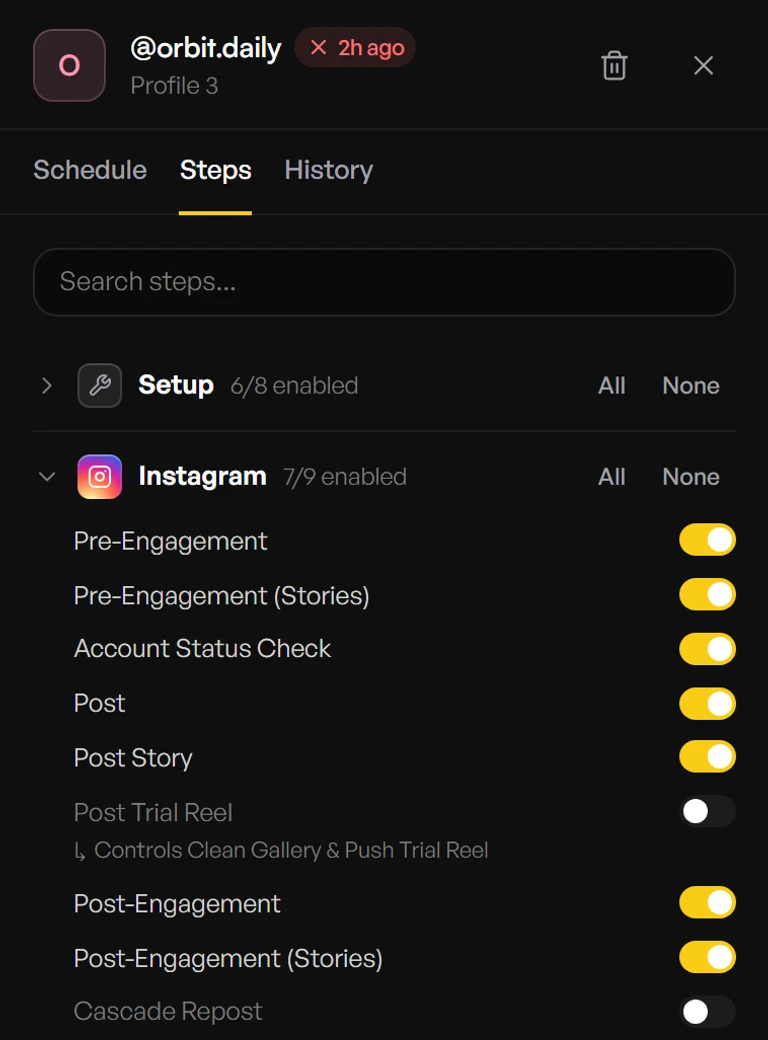
Starting to Post
When the account has a few days of normal use and no warnings, add one post slot a day on its Schedule tab. Keep Post Trial Reel off on the Steps tab, because fresh accounts can't post trial reels yet. Add more slots, comments and your bio link later, one change at a time.
Watch for Warnings
Check the account's History and Overview's Needs attention after each run. Turn on Skip posting if flagged in the account's Schedule tab so a flagged account doesn't post. If a run fails with an action block, a login challenge or a notice, turn the account's Posting off and look at the phone with Mirror before doing anything else.
What ShadowPhone Doesn't Do
There is no automatic warm-up mode or schedule. You decide when each account starts posting, using Account Status and Instagram's in-app notices as your feedback.
Need more help?
Contact support for help with your setup, or browse the rest of the docs.